A little more
headspace.

Less to keep in your head.
More room for what matters.

Explore the apps
Considered tools for everyday life.
Built by Dylan Ambrose

The Averic collection

Little things.
Better, together.

Different parts of your day. The same care in every detail.
Pick the tool you need. Make it yours.

Guidance icon

Guidance

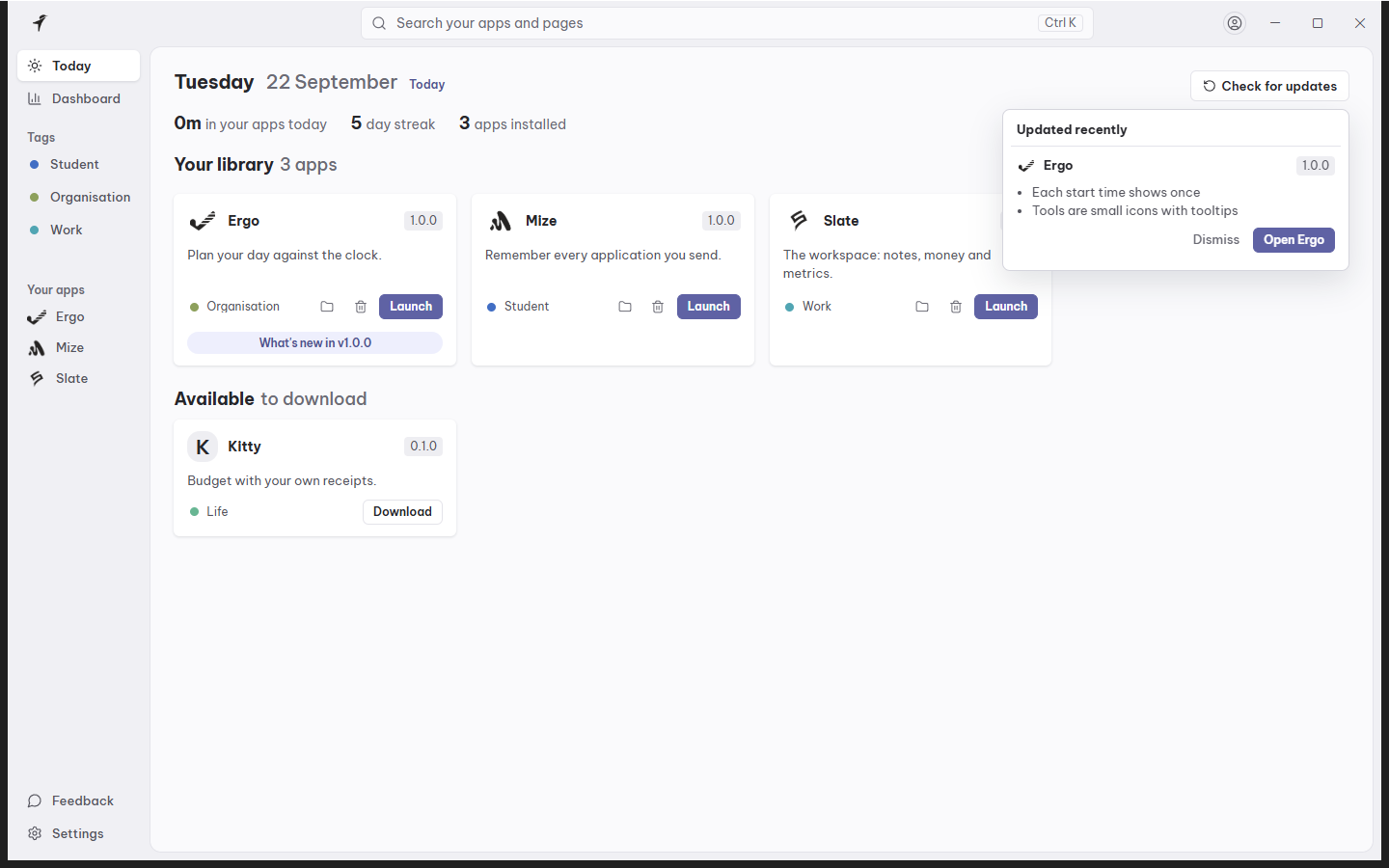
A home for your everyday tools.

Everything you need.
One familiar place.

Your apps, your next tasks, your starting point. Guidance brings your desktop tools together so getting started takes less effort.

  • Launch your apps from one library
  • See what’s waiting across the suite
  • Discover and download Averic apps
Made for Mac and Windows
Guidance · Today view · Sample content
Mize icon

Mize

Your next chapter starts here.

Every application.
Every reply.
Nothing lost.

A job search is enough to think about. Keep a record of where you applied, who replied, and what comes next.

  • Your applications in one place
  • A clear record of employer replies
  • Less searching through old tabs
Made for Windows. iPhone next.
Mize · Your record · Sample content
Slate icon

Slate

Room for everything you’re building.

Your ideas.
Your work.
A clearer picture.

Notes, subscriptions and the shape of your business. Bring the moving parts into one workspace, and make room for the next good idea.

  • Notes that stay close to the work
  • A view of subscriptions and spending
  • Your apps and their metrics together
In development · Windows
Slate · Overview · Development preview · Sample content

How it fits together

One download.
The rest follows.

  1. 01Install Guidance

    Guidance is the home for the collection. One download, and no account needed to start.

  2. 02Pick your apps

    Every Averic app installs from the library inside Guidance, free to begin with.

  3. 03They stay current

    Guidance checks for updates and installs them, so each app keeps improving on its own.

Our goal

Your life is bigger
than your to-do list.

  • Plan a little.01
  • Find your focus.02
  • Make time for life.03

Good software should give something back.
A clearer day. A quieter mind. More of your own time.

That’s the idea behind Averic. Thoughtful tools for the everyday things, built to help you get on with the rest of your life.

A moment away from the screen, playing pool
An independent software studioBy Dylan Ambrose

About

Hi, I’m Dylan.
I made Averic.

I’m an independent developer building tools for the things that fill a day: planning work, finding your next opportunity, and keeping everything within reach.

Averic is a small collection with a simple idea. Make something useful. Care about how it feels. Keep making it better.

Meet the maker on GitHubDylan.

Why I build

A small studio.
My personal standard.

If you’re like me, you never end up doing what you meant to in a day. It’s always “I’ll do it later” or “tomorrow”. Computer science got me interested in the moments where software makes a day feel easier: knowing what to do next, finding the one note you need, actually finishing a structured day.

That’s what I want Averic to be: a collection of tools I’m proud to keep improving, eventually in your pocket too. I build independently, listen to the people using the apps, and let the everyday details shape what comes next. I’m behind every update, so if something could be better, I want to hear about it.


The future · A new chapter

The same care.
Wherever you are.

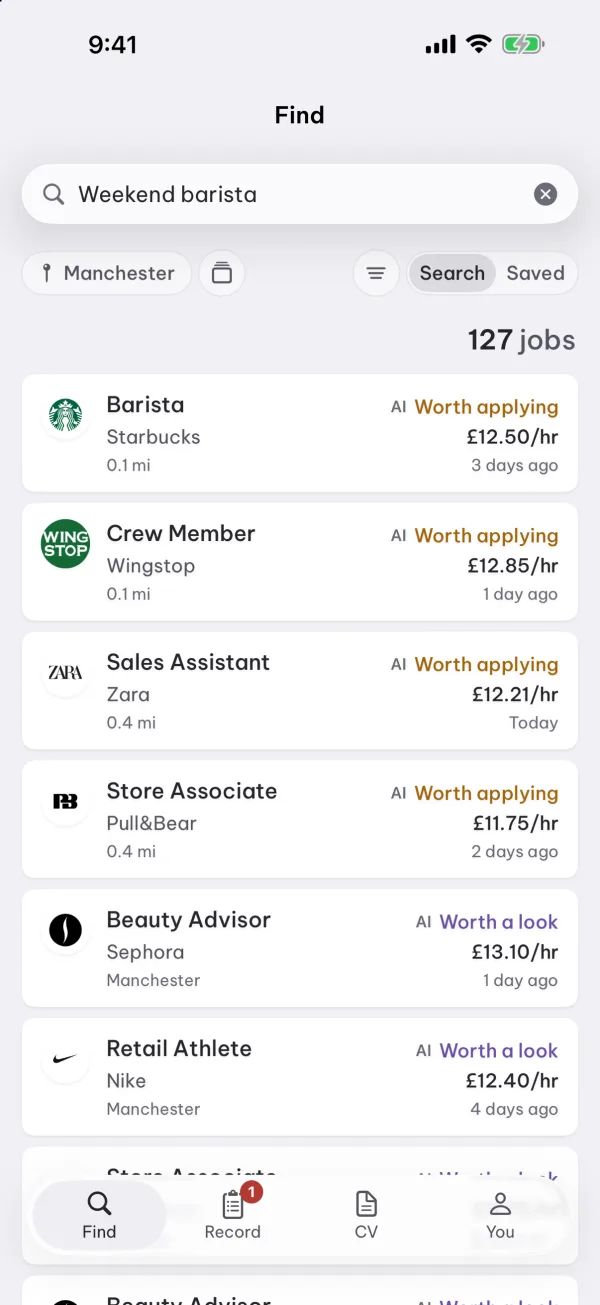
The next chapter of Averic is iPhone and Mac. Guidance is on the Mac today, and Mize is coming to iPhone: thoughtful native apps, made to feel at home on the devices you love.

Mize for iPhone’s Find view: part-time jobs near you, rated for a first job
iPhone · Mize, in testing
Guidance shown in a MacBook mockup
MacBook · Guidance for Mac

Mize for iPhone is in testing. Its release date is still to come.

Pricing

Your everyday.
Your kind of plan.

Start with Free. Make room for more with one Pro plan across every Averic desktop app, on Windows and Mac.

Free

£0/ forever

The everyday essentials.

A good place to start. What each app is for stays free.

Get startedMore about Free
  • Every Averic app in Guidance, plus 3 third-party apps
  • Mize: every application and reply, 3 AI job searches a day, 3 CV tailorings a month

Lifetime

£99/ once

One payment. No subscription.

For the people who like their tools to feel like their own.

Get startedMore about Lifetime
  • The same Pro features, in every desktop app
  • No monthly or yearly renewal
  • Mize's AI allowance as on Pro: 10 searches a day
  • iPhone apps are sold separately

Secure checkout by Stripe

Paid plans check out securely with Stripe. The planned trial gives you 14 days of Pro, with no card required, then returns you to Free.

A few good
questions.

Where can I use Averic’s apps?

Guidance is available for Mac and Windows, and Mize for Windows, with Mize for iPhone in testing. Slate is in development; join its waitlist to hear when it is ready.

Do I need the whole collection?

No. Start with the app that fits your day. Guidance gives the collection a shared home, and can help you discover, download and launch the other apps.

What’s the best place to start?

Choose Guidance if you want a home for your apps, Mize for your job hunt, or join the Slate waitlist for its next chapter. You can explore the screenshots above before choosing.

How can I suggest something?

Use the feedback board inside your app to share an idea or report a problem. You can also find the maker and each app’s release history on GitHub.

Get started

Find your
everyday companion.

No account needed to start. Your tasks, notes and applications stay on your computer.

Product preview

Product preview with sample content.